
IRS Login
Waiting on the phone to communicate with the IRS can be frustrating. The mail system can also result in long wait times, taking months to receive information. The quickest and simplest method for obtaining certain IRS information is to establish an online account. This guide outlines the steps required to set up and login to an online account with the IRS and how to verify your identity.
What is ID.me?
ID.me is a third-party identity verification service used by the IRS and other government agencies. Additionally, they provide this service to various businesses in multiple industries. The company must adhere to strict security protocols to work with the federal government. It's unique in that it offers both photo and video chat authentication, which enhances security while making the service more accessible to a wider range of people.
How to Set Up an IRS Online Account using ID.me
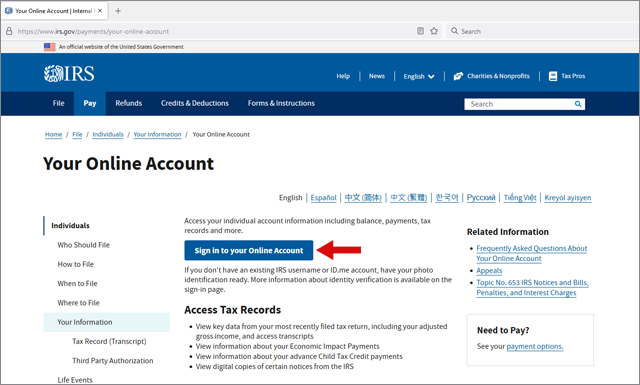
1. To start, visit the IRS website, choose "Sign in to your Online Account".
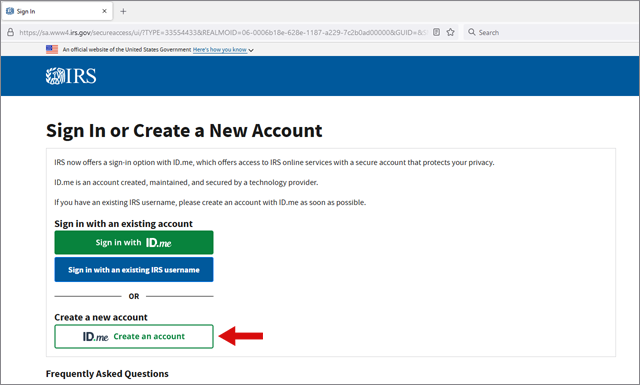
2. Then, click on "ID.me Create an account".
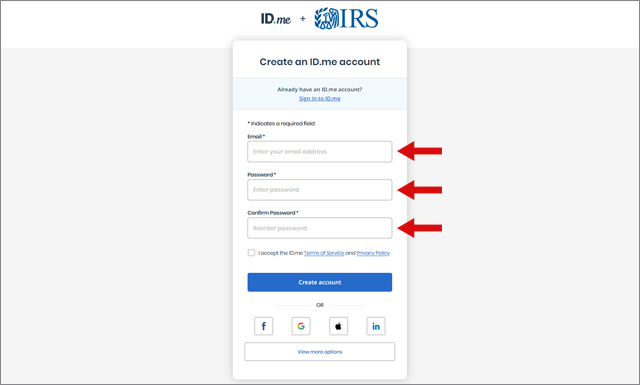
3. Enter your email address. Choose and confirm your password.
4. Check your email, open the message from ID.me, and select "Confirm Your Email" or copy and paste the link provided.
5. Set up multi-factor authentication by entering your phone number and choosing text or call. ID.me will then send you a code via call or text. Alternatively, you can use push notification, code generator, NFC-enabled security key, or FICO security key to complete this step.
6. Verify your identity through a video selfie or a video chat with a live agent.
7. Provide your Social Security Number.
8. Review the information for accuracy and complete the process.
Note: Video chat with an agent can be a helpful option if you are unsure how to capture a video selfie, or if you need extra assistance setting up your IRS online account. However, it takes longer and requires two forms of ID. A video chat with an agent takes approximately 5-10 minutes and an additional 30-minute wait time. Uploading your own video selfie takes around 5-10 minutes.
How to Login to your IRS Online Account
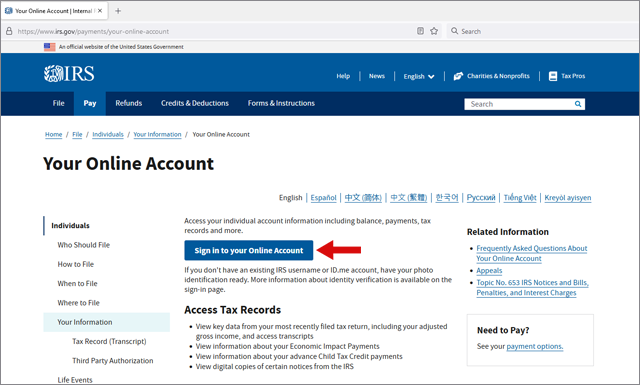
1. Once you have created an IRS Online Account using ID.me and have verified your identity, visit the IRS website and select "Sign in to your Online Account".
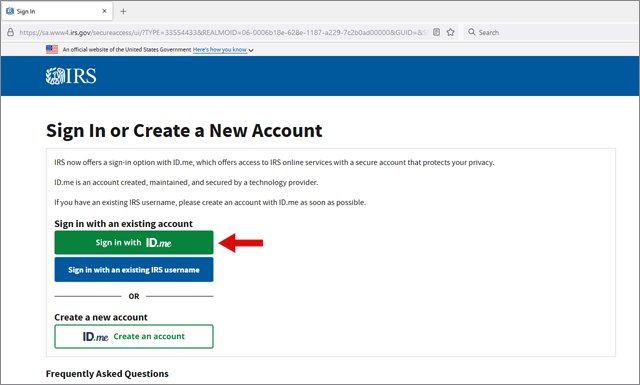
2. Click on "Sign in with ID.me".
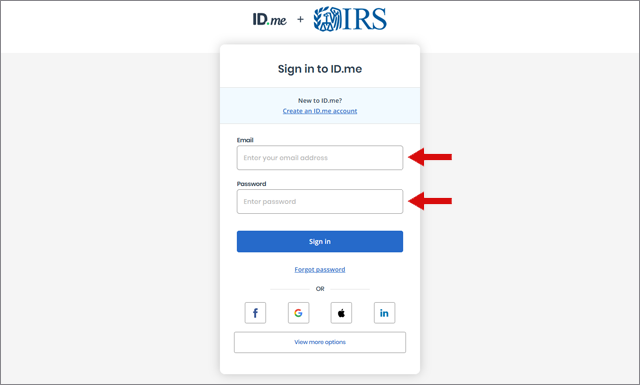
3. Enter your email address and password. Click "Sign In".
If you have trouble signing in, you may need to change or reset your IRS password.
Features Available Through an IRS Online Account
With an IRS online account, you have access to the following features:
• Online tax payment.
• Payment plan management and information.
• Continuously updated balance information.
• Inspection of your balance history.
• Examination of payment history and pending or scheduled payments.
• Previous tax return information.
• Ability to request a tax transcript and view your tax records.
Why You Should Have an IRS Online Account
- Finding your adjusted gross income (AGI) - When filing your tax return, you may be required to enter your AGI from the previous year. If you don't have a copy of your previous year's return, you can easily access your AGI through your online IRS account.
- Checking estimated tax payments - If you made estimated tax payments, you can use your online account to check how much you paid and if the payments were received by the IRS. You can also use the account to determine how much you should pay in estimated taxes.
- Checking other details - With the ability to access up-to-date information, you can use your online account to verify the amounts of any stimulus payments or advance child tax credits you received. This information is crucial in ensuring that you enter the correct numbers on your tax returns.
- Seeing how much you owe the IRS - If you owe money to the IRS, it can be stressful, but it becomes even more so if you don't know how much you owe. Your online account updates your balance daily, so you can easily access the information you need.
- Reviewing your payment history - With different types of payments like estimated payments, payment plans, and random payments, it can be difficult to track how much you've paid and how much you still owe. However, this information is available in your online account, making it easier for you to keep track of your payments.
- Getting copies of IRS notices - If you are unsure whether IRS notices are reaching you or if you've lost an IRS notice, you can get copies of them through the message section of your online account.
- Ordering tax records - If you need to file an old return but don't have the necessary forms, such as W2s or 1099s, you can use your online account to order this information. The Get Transcript section of the app makes it easy to get started.
- Signing digital authorization forms - Your tax professional can start a power of attorney form and send it to your online IRS account. From there, you can easily sign the form digitally, saving time and effort compared to traditional paper forms.
In conclusion, setting up an online account with the IRS provides many benefits that can make the process of filing tax returns and making tax payments easier and more convenient.